
Telegram Publishing System
Social media posts managed from one chat
Excel or CSV contacts added automatically
Upload an Excel or CSV of contacts and a group name: the group is created, everyone is added in throttled batches, and anyone WhatsApp refuses to add receives the invite link instead.
The steps are listed in the order the graph reaches them, so where the diagram splits, its branches follow one another in the list. A step that ends in a question mark is a fork: a run takes a single branch after it, as the diagram shows.
Contacts upload form
Read the spreadsheet
Normalise phone numbers
Create WhatsApp group Whapi
Batch the contacts
Add participants Whapi
Find members not added Whapi
Send invite link Whapi
The diagram is drawn from the real node graph, with names simplified and nothing sensitive in it.
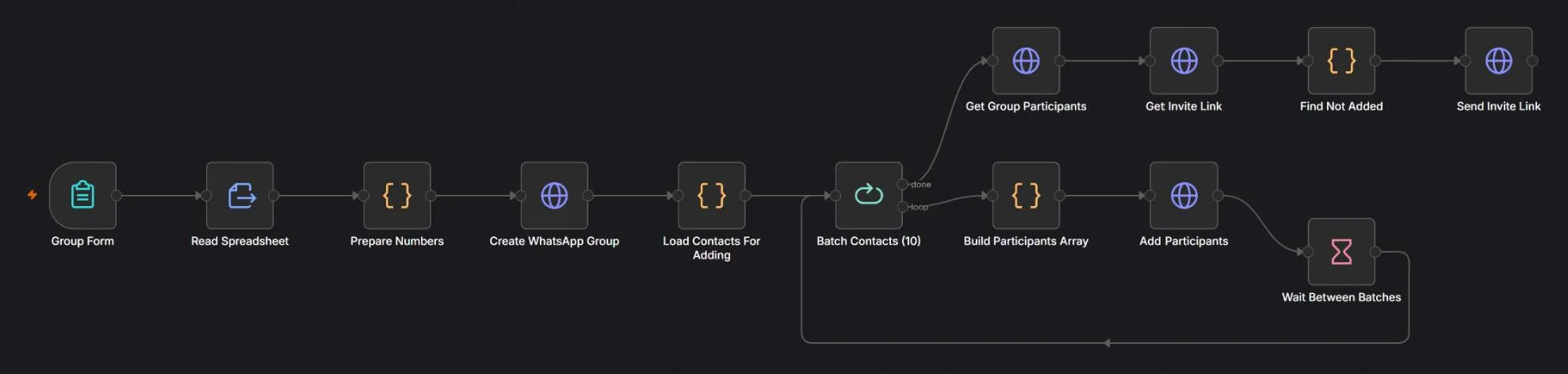
A list in a spreadsheet becomes a working group in minutes.
Social media posts managed from one chat
Customer messages, with AI-drafted replies
Posts with AI captions and branded images
Personal emails written by AI for every contact
Whether it is Arabic document processing, an internal tool nobody enjoys using, or a workflow that quietly eats your team's week, send me a few real samples of it, and I will tell you what I would automate first.