
Google Review Reply Manager
Automatic Google review replies with n8n
Shop bookings through buttons, built with n8n
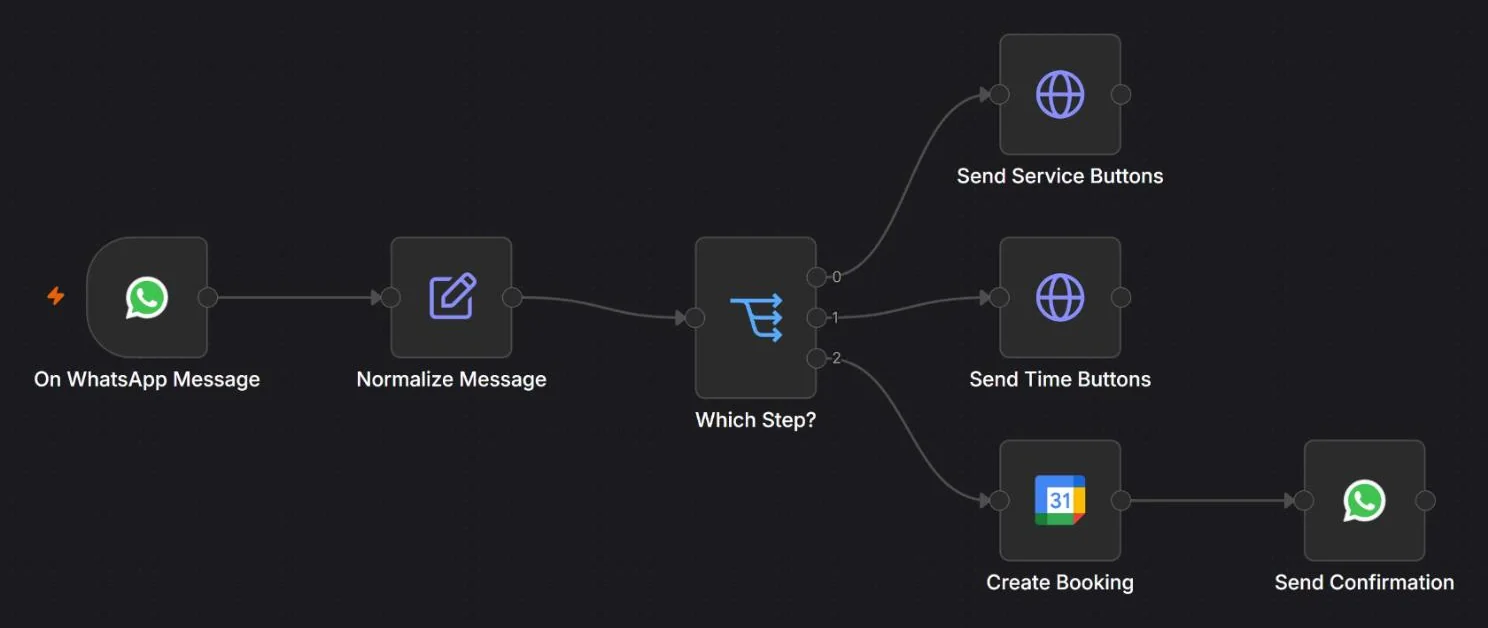
A customer taps a service, then a time slot, in WhatsApp buttons. The confirmed slot is written to Google Calendar and confirmed back on WhatsApp.
The steps are listed in the order the graph reaches them, so where the diagram splits, its branches follow one another in the list. A step that ends in a question mark is a fork: a run takes a single branch after it, as the diagram shows.
WhatsApp message WhatsApp
Normalise the message
Which step?
Service buttons WhatsApp
Time-slot buttons WhatsApp
Create the booking Google Calendar
Send confirmation WhatsApp
The diagram is drawn from the real node graph, with names simplified and nothing sensitive in it.
A shop takes bookings around the clock without answering the phone.
Automatic Google review replies with n8n
Bank transfer receipts read by AI vision
Posts with AI captions and branded images
Whether it is Arabic document processing, an internal tool nobody enjoys using, or a workflow that quietly eats your team's week, send me a few real samples of it, and I will tell you what I would automate first.